
Evolution D5 Golf Cart Owner Onboarding Guide
Before You Begin
Please note that the Evolution D5 Golf Cart Owner Onboarding Guide is provided for informational and educational purposes only. It is intended to help new owners become familiar with the operation, features, maintenance, and safe use of their Evolution D5 golf cart.
This guide is not a substitute for the official Evolution D5 Owner’s Manual.
All owners are strongly encouraged to read and understand the complete Owner’s Manual supplied with their vehicle before operating, charging, maintaining, transporting, or storing the golf cart. The Owner’s Manual contains important safety information, operating procedures, maintenance requirements, warnings, specifications, and limitations that may not be fully covered in this guide.
While every effort has been made to ensure the information contained in this guide is accurate and up to date, the official Owner’s Manual remains the primary and authoritative source of information for your vehicle. In the event of any discrepancy between this guide and the Owner’s Manual, the information contained in the official Owner’s Manual shall prevail.
Vehicle specifications, features, procedures, and recommendations may change without notice and may vary by model year, vehicle configuration, or market.
Owners should always follow applicable local laws, regulations, and safety requirements when operating their vehicle.
By using this guide, you acknowledge that it is intended solely as a supplemental resource to assist with owner education and onboarding and does not replace the responsibility of reading and following the official Evolution D5 Owner’s Manual.
Chapter 1: Before Your First Drive
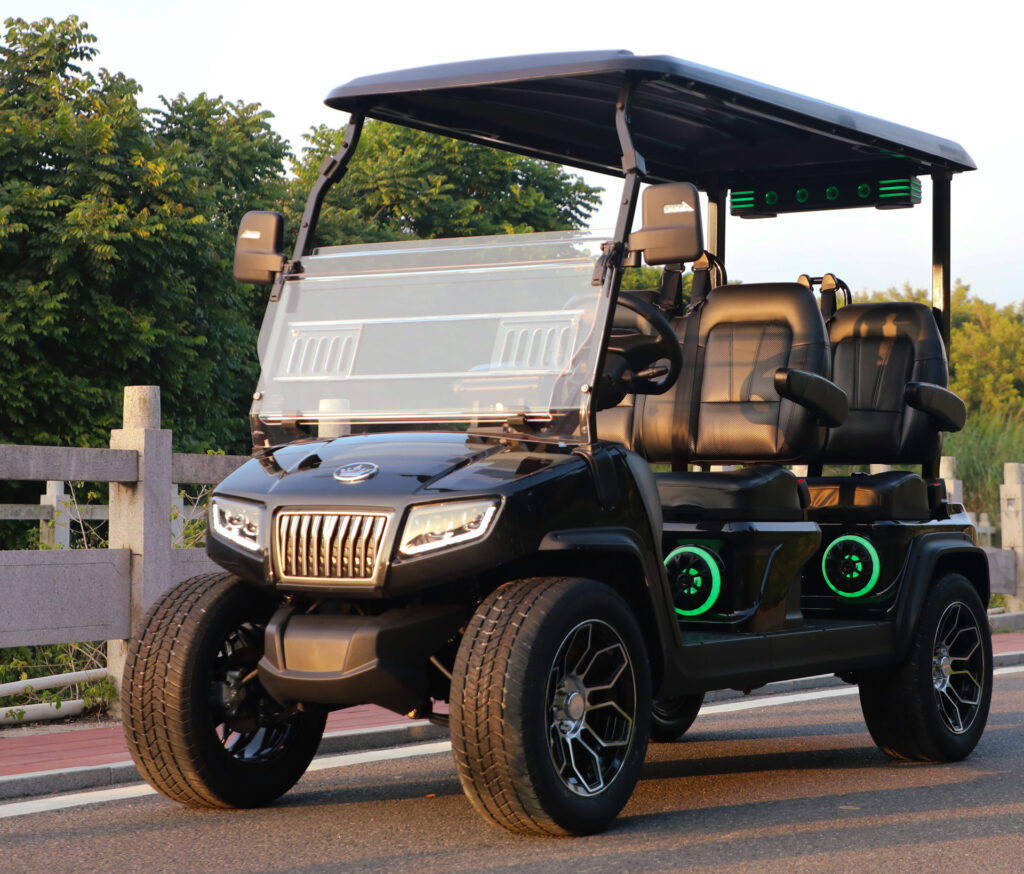
1.1 Vehicle Overview
- Familiarize yourself with the location of all controls: steering wheel, pedals, direction selector (R/N/D), power button, lights, horn, and dashboard indicators.
- Know where the battery, charger port, and USB ports are located.
- Review the Owner’s Manual to identify safety labels and important components.
(Manual pages 6–7)
1.2 Safety First
- Read and understand all warning labels on the vehicle:
- Danger / Warning – Situations that may cause serious injury or death.
- Caution – Situations that may cause minor injury.
- Notice – Situations that may cause property damage.
- Ensure all passengers understand proper seating and safety procedures.
- Children should not operate or ride on the cart unsupervised.
(Manual pages 6–11)
1.3 Pre-Drive Inspection
Before each drive, check the following:
- Battery Charge: Ensure sufficient charge for your trip.
- Brakes and Pedals: Test brake and accelerator for proper operation.
- Tires: Check for correct pressure (~22 PSI) and condition.
- Lights and Horn: Confirm all indicators and horn function.
- Loose Components: Check rear axle, battery cables, and wheel lug nuts.
(Manual pages 13–14)
1.4 Starting the Vehicle
- Make sure the key fob is inside or near the vehicle (max ~3.3 ft).
- Set the direction selector to Neutral (N).
- Press and hold the brake pedal.
- Press the Power button to start the vehicle.
(Manual page 15)
1.5 Driving Basics
- Select Drive (D) to move forward, Reverse (R) to move backward.
- Use the accelerator to move and brake pedal to slow down or stop.
- Always operate at safe speeds and avoid sharp turns, sudden stops, and steep slopes.
(Manual page 16)
1.6 Using Vehicle Controls
- Turn Signals: Use the control stalk to signal left or right turns.
- Lights: Rotate the headlight control knob for low beam; pull the stalk for high beam.
- Horn: Press the horn button on the steering wheel.
- Steering Column Adjustment: Press the knob and move the column to your preferred height.
- Rearview Mirrors: Fold in manually to avoid damage.
(Manual pages 17–19)
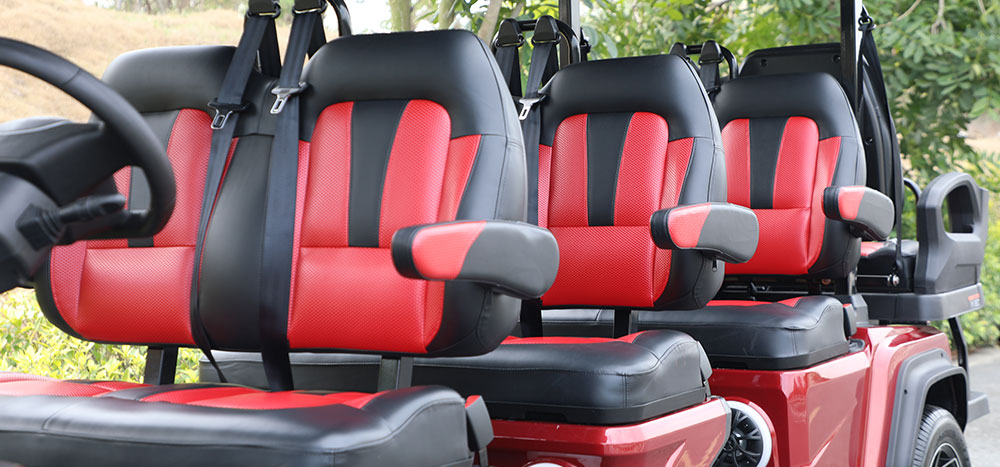
1.7 Seats and Storage
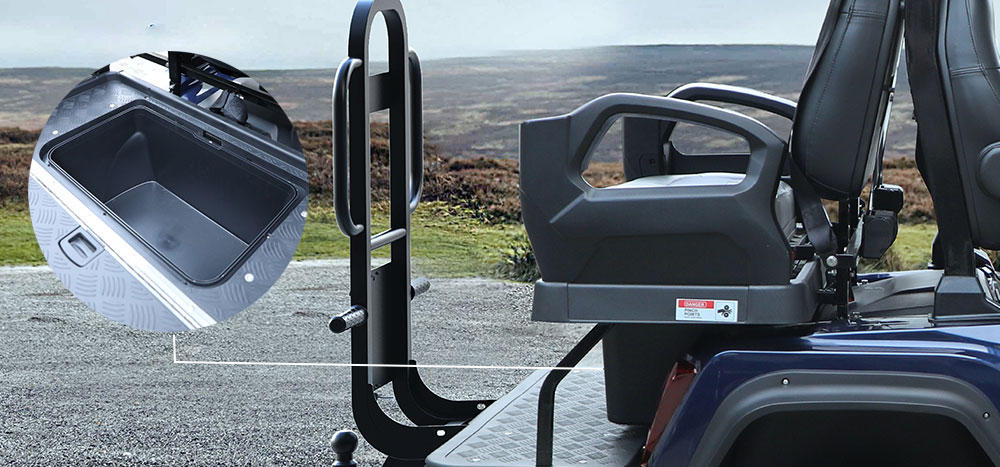
- Rear Flip Seat & Storage: Lift rear seat to access storage bucket.
- Golf Bag Holder: Adjust straps and fasten securely for transport.
- Ensure all compartments are securely closed before driving.
(Manual page 20)
Chapter 2: Understanding D5 Dashboard and Controls
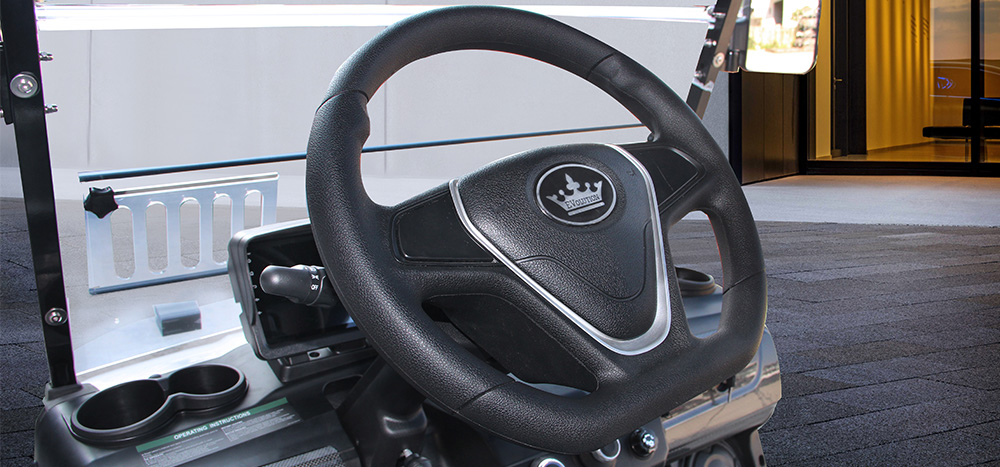
Now that you’ve completed your first drive, it’s time to become familiar with the controls and indicators you’ll use every day. Understanding your dashboard and vehicle controls will help you operate your D5 safely and confidently.
2.1 Dashboard Overview
The dashboard provides important information about your vehicle’s operating status.
Key information displayed includes:
- Vehicle speed
- Battery state of charge
- Driving direction (Drive, Neutral, Reverse)
- Lighting indicators
- Turn signal indicators
- Warning messages and fault notifications
2.2 Understanding the Battery Gauge
The battery gauge shows the current state of charge (SoC) of the lithium battery.
Best Practices- Charge the battery to full after each use.
- Charge the battery before the battery reaches a low level.
- Monitor battery percentage before longer trips.
- Develop a habit of checking battery level before leaving home, the golf course, or your destination.
2.3 Direction Selector
The D5 uses a three-position direction selector:
- Drive (D) Used for normal forward operation.
- Neutral (N) Used when starting the vehicle and when the vehicle should remain stationary without selecting a travel direction.
- Reverse (R) Used when backing up.
2.4 Accelerator and Brake Pedals
Accelerator Pedal
Press the accelerator pedal gradually to begin moving.
For the smoothest ride:
- Accelerate gradually.
- Avoid sudden full-throttle starts.
- Reduce speed before entering turns.
Brake Pedal
Use the brake pedal to slow and stop the vehicle.
Always apply steady pressure when stopping and allow extra stopping distance on wet or loose surfaces.
2.5 Turn Signals
The D5 is equipped with turn signals to help communicate your intentions to pedestrians and other vehicles.
Using the Turn Signals- Move the signal stalk upward for a right turn.
- Move the signal stalk downward for a left turn.
- Return the stalk to the center position after completing the turn.
2.6 Lighting Controls
The D5 is equipped with headlights, taillights, and high-beam functionality.
- Headlights
Use the light control switch to turn headlights on and off. - High Beams
Use the control stalk to activate high beams when additional visibility is needed. - Best Practice
Always verify your lights are functioning properly before operating the vehicle at dusk, dawn, or nighttime.
2.7 Horn
The horn is an important safety feature used to alert pedestrians, cyclists, and other drivers.
Use the horn responsibly and only when necessary to improve safety.
2.8 Steering Wheel Adjustment
The steering column can be adjusted for improved comfort.
To Adjust:- Release the steering column adjustment lever.
- Move the steering wheel to the desired position.
- Secure the lever before operating the vehicle.
2.9 Rearview Mirrors
The D5 is equipped with side mirrors to improve visibility.
Mirror AdjustmentAdjust mirrors before driving so that you have a clear view behind and beside the vehicle.
Folding MirrorsThe mirrors can be folded inward when parking or transporting the vehicle to help prevent damage.
2.10 USB Charging Ports
The D5 includes USB charging ports for mobile devices.
Tips for Use
- Use high-quality charging cables.
- Charging performance may vary depending on the device.
- USB ports are intended for charging and supported multimedia functions.
Owner Checklist
Before every drive:
✓ Battery charge sufficient for planned use
✓ No warning indicators displayed
✓ Mirrors adjusted
✓ Lights functioning properly
✓ Steering wheel securely adjusted
✓ Direction selector operating normally
✓ Horn functioning properly
By becoming familiar with these controls early in ownership, you’ll be able to operate your Evolution D5 safely, comfortably, and confidently.
Chapter 3: Touchscreen and Technology Features
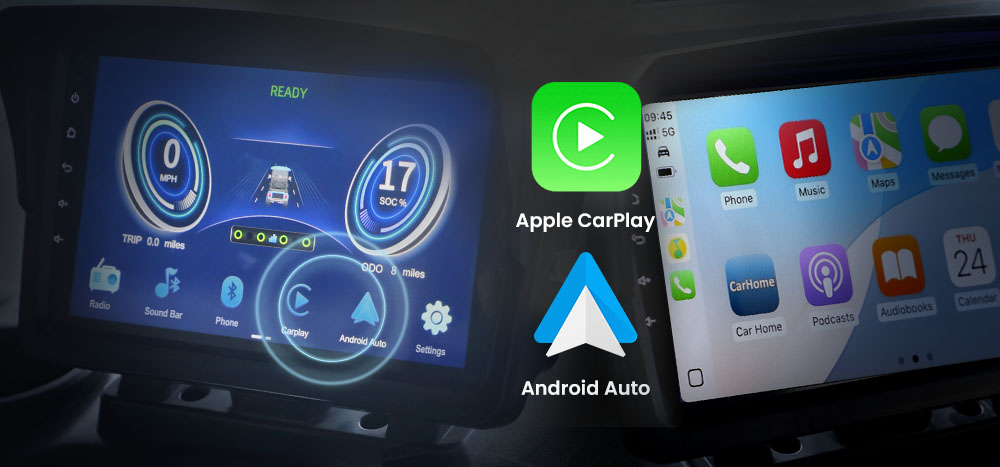
One of the standout features of the Evolution D5 is its integrated touchscreen display. The touchscreen serves as the central hub for vehicle information, entertainment, connectivity, and system settings. This chapter will help you become familiar with the touchscreen and its key functions.
3.1 Getting Familiar with the Touchscreen
The touchscreen is designed to provide quick access to vehicle information and multimedia features.
Depending on your model and software version, the touchscreen may provide access to:
- Vehicle information
- Bluetooth connectivity
- Audio controls
- Apple CarPlay
- Android Auto
- USB functions
- System settings
- Backup camera display (if equipped)
3.2 Bluetooth Connection
Bluetooth allows you to connect your smartphone wirelessly to the vehicle.
Benefits of Bluetooth- Hands-free phone calls
- Audio streaming
- Wireless connectivity to supported devices
- Turn on Bluetooth on your smartphone.
- Open the Bluetooth menu on the touchscreen.
- Search for available devices.
- Select your vehicle from the list.
- Confirm the pairing request on both devices.
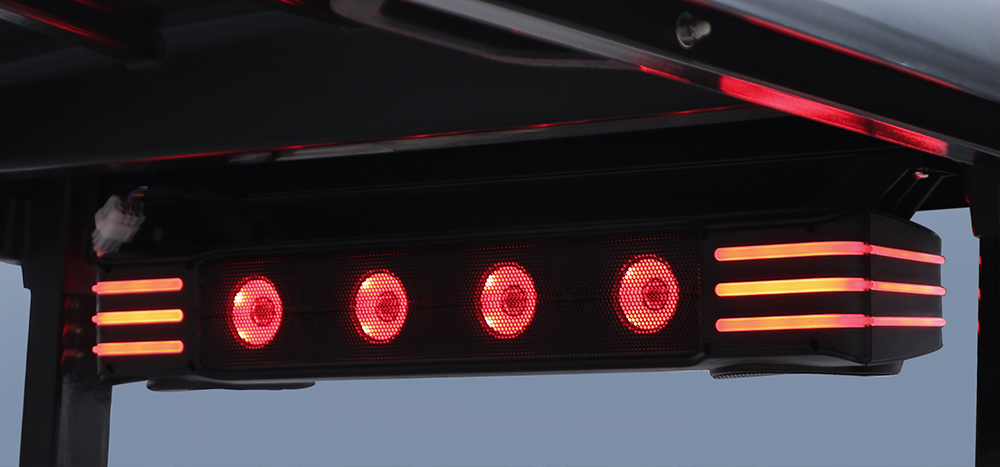
3.3 Audio System and Sound Bar
The D5 is equipped with an integrated audio system and sound bar designed to enhance your driving experience.
Audio Features
- Music playback
- Bluetooth audio streaming
- Volume adjustment
- Audio source selection
Best Practices
- Keep volume at a level that allows you to remain aware of your surroundings.
- Avoid distractions while driving.
- Adjust audio settings before beginning your trip whenever possible.
3.4 Apple CarPlay
Apple CarPlay allows compatible iPhones to integrate with the touchscreen display.
Benefits
- Navigation
- Phone calls
- Messaging
- Music and podcasts
- Voice control through Siri
Getting Started
- Ensure your iPhone supports Apple CarPlay.
- Connect your phone according to the vehicle’s setup instructions.
- Follow the prompts displayed on the touchscreen.
Once connected, approved apps can be accessed directly through the vehicle display.
3.5 Android Auto
Android Auto provides similar functionality for compatible Android devices.
Features- Navigation
- Phone calls
- Messaging
- Music streaming
- Google Assistant integration
- Verify your phone supports Android Auto.
- Follow the connection instructions on the touchscreen.
- Grant necessary permissions on your phone.
3.6 USB Ports
The D5 includes USB ports for charging and multimedia functions.
Common Uses
- Charging mobile devices
- Connecting compatible devices
- Supporting multimedia functions
Tips
- Use quality charging cables for best performance.
- Some functions may require specific cable types.
- Charging speed may vary depending on the connected device.
3.7 System Settings
The touchscreen allows access to various system settings.
Depending on vehicle configuration, settings may include:
- Display preferences
- Audio adjustments
- Connectivity options
- Vehicle information
- System updates
3.8 Caring for the Touchscreen
The touchscreen is designed for everyday use but should be treated carefully.
Recommended Practices- Use a soft microfiber cloth for cleaning.
- Avoid abrasive cleaners.
- Do not spray liquids directly onto the screen.
- Protect the display from impacts and sharp objects.
Chapter 4: Battery Charging and Battery Care
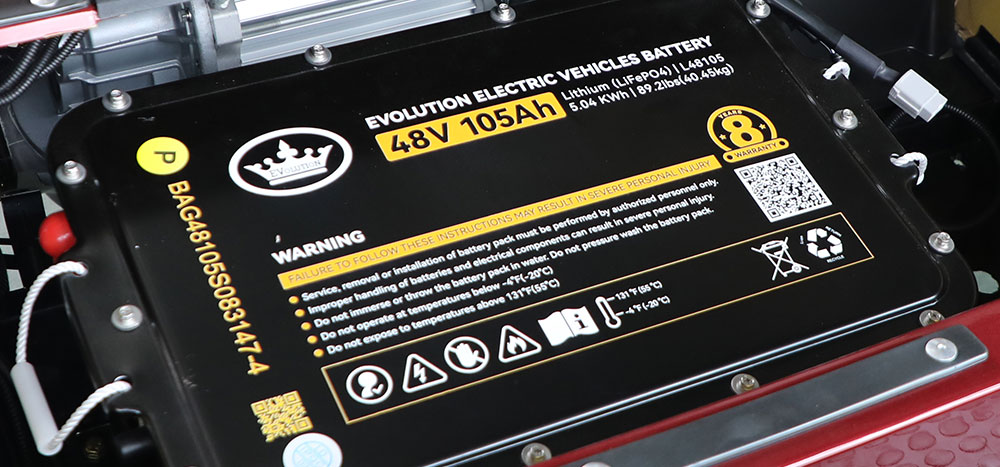
Your Evolution D5 is powered by a lithium battery system designed to provide reliable performance, long service life, and minimal maintenance. Proper charging and storage habits will help maximize battery life and ensure your vehicle is always ready when you need it.
This chapter covers the fundamentals of charging, battery care, and long-term storage.
4.1 Understanding Your Lithium Battery
The D5 is equipped with a lithium battery pack and battery management system (BMS) designed to monitor and protect the battery during operation and charging.
Benefits of Lithium Batteries- Longer service life
- Faster charging
- Reduced maintenance
- Consistent performance
- No water maintenance required
4.2 Charging Your D5
Charging your vehicle regularly is one of the most important responsibilities of ownership.
To Charge the Vehicle- Park the vehicle in a dry, well-ventilated area.
- Turn the vehicle off.
- Connect the charger to the vehicle charging port.
- Connect the charger to a suitable AC power outlet.
- Allow the charging cycle to complete.
4.3 Understanding Charging Status
During charging, the charger and battery system may display various indicators showing charging progress.
General Guidelines- Charging is in progress when charging indicators are active.
- Charging is complete when the charger indicates a full charge.
- Disconnect the charger after charging is complete unless otherwise instructed by the battery manufacturer.
4.4 Daily Charging Best Practices
Following a few simple habits can help extend battery life and improve vehicle readiness.
Recommended Practices- Charge the vehicle after use whenever practical.
- Keep the battery adequately charged during periods of regular use.
- Use only approved charging equipment.
- Keep charging ports clean and free of debris.
- Charge the vehicle in a dry environment.
4.5 Battery Safety
Important Safety Guidelines
- Do not open, disassemble, or modify the battery pack.
- Do not short-circuit battery terminals.
- Keep the battery away from open flames and excessive heat.
- Do not expose the battery pack to standing water or submerge it.
- Contact an authorized dealer if battery damage is suspected.
4.6 Vehicle Storage
If your D5 will not be used for an extended period, proper storage procedures are important.
Before Storage- Clean the vehicle.
- Charge the battery according to manufacturer recommendations.
- Store the vehicle in a dry location.
- Remove any unnecessary electrical accessories.
- Periodically check battery charge level.
- Recharge the battery as recommended in the Owner’s Manual.
- Inspect the vehicle periodically for signs of damage or moisture.
4.7 Returning the Vehicle to Service
Before driving a vehicle that has been stored:
Inspection Checklist
✓ Check battery charge level
✓ Verify charger operation
✓ Inspect tires for proper inflation
✓ Check lights and controls
✓ Verify brake operation
✓ Inspect for visible damage
Completing a quick inspection before returning the vehicle to service can help identify issues before they become problems.
4.8 Battery Recycling and Disposal
Lithium batteries should never be disposed of with household waste.
When a battery reaches the end of its service life:
- Contact an authorized Evolution dealer.
- Follow local recycling regulations.
- Utilize approved battery recycling programs.
4.9 Protecting Your Battery Investment
The battery is one of the most important components of your D5.
To maximize battery life:
✓ Follow recommended charging procedures
✓ Use approved charging equipment
✓ Avoid neglecting the battery during long storage periods
✓ Follow all safety instructions provided by Evolution
✓ Refer to the Owner’s Manual for detailed battery specifications and requirements
Good charging habits today can help ensure years of dependable performance.
4.10 Winter Storage Checklist
If your Evolution D5 will be stored during the winter months or for an extended period of inactivity, following these steps can help protect the battery and ensure the vehicle is ready when the season returns.
Before Storage
✓ Clean and dry the vehicle thoroughly. (Do not use a garden hose or pressure washer to wash your golf cart. Excessive water may enter electrical components, connectors, switches, and electronic systems, potentially causing damage that may not be immediately apparent. For routine cleaning, use a damp cloth, sponge, and mild soap solution.)
✓ Inspect tires and inflate them to the recommended pressure.
✓ Remove any debris from the vehicle and storage compartments.
✓ Fully charge the battery according to the Owner’s Manual recommendations.
✓ Turn the vehicle off and remove any unnecessary accessories.
✓ Store the vehicle in a dry, covered location whenever possible.
During Storage
✓ Check the battery charge level periodically.
✓ Recharge the battery as recommended in the Owner’s Manual.
✓ Inspect the charger and charging cables for damage.
✓ Verify the storage area remains dry and well ventilated.
Before Returning to Service
✓ Verify the battery has sufficient charge.
✓ Inspect tires for proper inflation and condition.
✓ Test headlights, taillights, turn signals, and horn.
✓ Verify brake operation.
✓ Inspect the vehicle for signs of damage, corrosion, or loose components.
✓ Perform a short test drive in a safe area before normal operation.
Important Reminder
Improper battery storage is one of the most common causes of vehicle performance issues after long periods of inactivity. Always follow the battery storage recommendations provided in the official Evolution D5 Owner’s Manual.
Chapter 5: Routine Maintenance and Vehicle Care
Routine maintenance is one of the easiest ways to protect your investment and ensure your Evolution D5 continues to perform safely and reliably. Unlike traditional gas-powered vehicles, the D5 requires relatively little maintenance. However, regular inspections and proper care can help identify potential issues before they become costly repairs.
5.1 Why Routine Maintenance Matters
Regular maintenance helps:
- Extend vehicle life
- Improve safety
- Maintain vehicle appearance
- Protect battery and electrical systems
- Reduce unexpected downtime
5.2 Monthly Owner Inspection
At least once each month, perform a visual inspection of your vehicle.
Inspect the Following:
✓ Tires
✓ Wheels and lug nuts
✓ Battery charge level
✓ Lights and turn signals
✓ Horn
✓ Mirrors
✓ Steering operation
✓ Brake pedal feel
✓ Charging port condition
✓ Vehicle body and roof hardware
If you notice anything unusual, contact your authorized Evolution dealer for assistance.
5.3 Tire Care
Your tires play an important role in ride quality, steering response, and safety.
Check Tire Pressure RegularlyProper tire inflation helps:
- Improve ride comfort
- Reduce tire wear
- Improve handling
- Maximize tire life
Refer to the tire pressure information provided in your Owner’s Manual or vehicle specifications.
Inspect Tires For:- Cuts or cracks
- Uneven wear
- Embedded objects
- Low air pressure
5.4 Brake System Inspection
Your braking system should be inspected regularly.
Check For:- Consistent brake pedal feel
- Smooth stopping performance
- Unusual noises during braking
- Signs of fluid leakage
Brake Fluid Periodically inspect the brake fluid reservoir and maintain the recommended fluid level according to the Owner’s Manual.
5.5 Lights and Safety Equipment
Before operating the vehicle, confirm that all safety-related equipment is functioning properly.
Check:
✓ Headlights
✓ Taillights
✓ Brake lights
✓ Turn signals
✓ Horn
✓ Reflectors
Maintaining proper visibility helps improve safety for both the driver and others nearby.
5.6 Steering and Suspension
The steering system should operate smoothly and without excessive play.
Inspect For:
- Loose steering feel
- Unusual noises
- Vehicle pulling to one side
- Excessive vibration
If any of these conditions are present, schedule an inspection with your dealer.
5.7 Cleaning Your D5
Keeping your vehicle clean helps preserve its appearance and protects painted and finished surfaces.
Recommended Cleaning Method
- Remove loose dirt using a soft cloth or brush.
- Wash with mild soap and water.
- Clean surfaces using a sponge or microfiber cloth.
- Dry thoroughly using a clean towel.
Important Cleaning Notice
To help protect electrical components and connectors, avoid spraying the vehicle directly with a garden hose, pressure washer, or high-pressure water source.
Water intrusion may damage electrical systems, connectors, switches, and electronic components.
5.8 Touchscreen and Interior Care
To maintain the appearance of your interior and touchscreen:
- Use a microfiber cloth for cleaning.
- Avoid abrasive cleaners.
- Do not spray cleaning products directly onto the display.
- Keep interior surfaces free of excessive moisture.
Regular cleaning helps preserve both appearance and functionality.
5.9 Vehicle Storage Between Uses
Even if your D5 is used regularly, proper storage habits can help extend component life.
Best Practices
✓ Park in a covered location whenever possible.
✓ Avoid prolonged exposure to extreme weather.
✓ Regularly charge the battery after each use.
✓ Keep the vehicle clean and dry.
✓ Inspect the vehicle periodically.
5.10 When to Contact Your Dealer
Contact your authorized Evolution dealer if you notice:
- Sudden or unexpected drops in battery percentage
- Charging issues
- Error code
- Brake concerns
- Steering problems
- Electrical malfunctions
- Physical damage to the battery system
Prompt attention can help prevent minor issues from becoming major repairs.
Chapter 6: Features and Convenience Functions
The Evolution D5 is equipped with a variety of comfort, convenience, and utility features designed to enhance your ownership experience. Some of these features are used every day, while others may not be discovered until months after taking delivery. This chapter introduces the key convenience features available on your D5 and explains how to get the most from them.
6.1 Rear Flip Seat System
One of the most versatile features of the D5 is the rear flip seat.
The rear seat can be configured for:
- Passenger seating
- Cargo transportation
- General utility use
Before Using the Rear Seat
✓ Ensure all passengers are seated properly.
✓ Verify the seat is securely locked into position.
✓ Do not exceed the vehicle’s passenger or cargo capacity.
Cargo Use
When transporting cargo:
- Distribute weight evenly.
- Secure loose items.
- Avoid carrying loads that obstruct visibility.
6.2 Rear Storage Compartment
The D5 includes a convenient storage compartment beneath the rear seat.
Accessing the Storage Area- Raise the rear seat.
- Open the storage compartment.
- Securely close the compartment before driving.
- Charging cables
- Cleaning supplies
- Golf accessories
- Small personal items
6.3 Golf Bag Holder
The integrated golf bag holder is designed to securely transport golf bags while maintaining vehicle balance.
Securing a Golf Bag
- Position the golf bag in the holder.
- Adjust the retaining straps.
- Secure all buckles and fasteners.
- Confirm the bag is stable before driving.
Best Practices
- Verify straps are tight before every trip.
- Avoid overloading the rear cargo area.
- Check bag security after traveling over rough terrain.
6.4 Adjustable Steering Column
The D5 allows drivers to adjust the steering wheel position for improved comfort.
To Adjust- Release the steering column adjustment lever.
- Move the steering wheel to the desired position.
- Lock the lever securely.
6.5 Foldable Side Mirrors
The side mirrors can be adjusted for visibility and folded inward when needed.
Benefits- Easier storage in tight spaces
- Reduced risk of mirror damage
- Improved clearance when transporting the vehicle
6.6 USB Charging Ports
The D5 includes USB charging ports for compatible devices.
Common Uses
- Charging smartphones
- Charging tablets
- Powering small electronic devices
Tips
- Use manufacturer-approved charging cables when possible.
- Avoid leaving devices unattended in extreme temperatures.
- Disconnect devices when not in use.
6.7 Cup Holders and Personal Storage
The dashboard area includes storage spaces designed for everyday convenience.
These areas can be used for:
- Beverage containers
- Mobile phones
- Small personal belongings
- Keys and accessories
6.8 Key Fob Convenience Features
The key fob is an important part of daily operation.
Owner Tips- Keep a spare battery available.
- Protect the fob from water exposure.
- Store the fob in a secure location when not in use.
- Avoid dropping or damaging the fob.
6.9 Making the Most of Your D5
Many owners use their D5 for much more than golf.
Common uses include:
- Neighborhood transportation
- Community events
- Resort transportation
- Campgrounds
- Property maintenance
- Recreational activities
Understanding the available convenience features can help you get the most value from your vehicle.
Chapter 7: Troubleshooting Basics
Even with proper care and maintenance, questions may occasionally arise during ownership. This chapter provides a basic troubleshooting guide to help owners identify common issues and perform simple checks before contacting their dealer. If a problem persists after completing these checks, contact your authorized Evolution dealer for assistance.
7.1 Vehicle Will Not Power On
If the vehicle does not power on:
Check the Following
✓ The battery has sufficient charge.
✓ The key fob is present and functioning properly.
✓ The vehicle is in Neutral (N).
✓ The brake pedal is fully depressed while pressing the Power button.
✓ No battery or charging cables are loose or damaged.
If the Vehicle Still Does Not Power On
Contact your authorized Evolution dealer for further diagnosis.
7.2 Vehicle Powers On but Will Not Move
If the display is active but the vehicle does not move:
Check the Following
✓ The direction selector is in Drive (D) or Reverse (R).
✓ The parking brake is released.
✓ No warning messages are displayed.
✓ The accelerator pedal moves freely.
✓ Battery charge level is sufficient.
If the Issue Persists
Contact your dealer for service.
7.3 Battery Will Not Charge
If the battery does not begin charging:
Check the Following
✓ The charger is properly connected to the vehicle.
✓ The charger is plugged into a functioning power outlet.
✓ The charging connector is clean and free of debris.
✓ No visible damage exists on the charger or charging cable.
✓ Battery charge level is displayed normally.
If Charging Still Does Not Begin
Disconnect the charger and contact your authorized dealer.
Do not attempt to repair charging equipment yourself.
7.4 Battery Percentage Appears Incorrect
If the battery percentage appears unusual:
Possible Causes
- Recent charging cycle
- Extended storage period
- Vehicle has not been used for an extended time
- Battery system requires evaluation
Recommended Action
Monitor the battery percentage during normal operation.
If you notice sudden or repeated drops in battery percentage that are not consistent with vehicle usage, contact your authorized Evolution dealer.
7.5 Touchscreen Not Responding
If the touchscreen becomes unresponsive:
Check the Following
✓ The vehicle is powered on.
✓ The screen is clean and dry.
✓ No protective covering is interfering with operation.
If the Issue Persists
Restart the vehicle and allow the system to reboot.
If normal operation does not return, contact your dealer.
7.6 Bluetooth Will Not Connect
If your phone will not connect:
Check the Following
✓ Bluetooth is enabled on your phone.
✓ The phone is discoverable.
✓ The device has not exceeded its pairing limit.
✓ Previous pairings have not created conflicts.
Helpful Tip
Delete the vehicle from your phone’s Bluetooth list and repeat the pairing process if necessary.
7.7 Apple CarPlay or Android Auto Not Working
If CarPlay or Android Auto fails to connect:
Check the Following
✓ Your phone supports the feature.
✓ All required permissions have been granted.
✓ Bluetooth or connection settings are enabled.
✓ Software updates are current.
If Necessary
Disconnect and reconnect the device according to the instructions in Chapter 3.
7.8 Lights Not Working
If headlights, taillights, or turn signals are not functioning properly:
Check the Following
✓ The light switch is in the correct position.
✓ The vehicle is powered on.
✓ No warning indicators are displayed.
✓ Visible wiring has not been damaged.
If the Problem Continues
Schedule service with your dealer.
7.9 Unusual Noises or Vibrations
If you notice unusual noises while driving:
Inspect For
✓ Loose cargo or personal items.
✓ Low tire pressure.
✓ Tire damage.
✓ Loose vehicle accessories.
Important
If the noise appears to come from the steering, suspension, brakes, or drivetrain, discontinue operation and contact your dealer.
7.10 When to Contact Your Dealer Immediately
Contact your authorized Evolution dealer as soon as possible if you observe:
- Sudden or unexpected drops in battery percentage.
- Battery warning messages.
- Charging failures.
- Electrical burning odors.
- Visible battery damage.
- Brake system concerns.
- Steering abnormalities.
- Physical damage affecting vehicle operation.
- Persistent fault codes or warning messages.
Do not continue operating the vehicle if a safety-related issue is suspected.

Chapter 8: Maximizing the Life of Your Evolution D5
Congratulations! By reaching this chapter, you’ve learned the fundamentals of operating, maintaining, and caring for your Evolution D5. The final step in becoming a successful owner is developing habits that help maximize the performance, reliability, and lifespan of your vehicle.
8.1 Build Good Charging Habits
Your battery is one of the most valuable components of your D5. Proper charging habits can help maximize its performance and longevity.
Recommended Practices
✓ Charge the vehicle regularly.
✓ Use only approved charging equipment.
✓ Keep charging ports clean and free of debris.
✓ Follow the battery storage recommendations outlined in Chapter 4.
✓ Periodically inspect charging cables and connectors for signs of wear or damage.
Good charging habits help ensure your D5 is always ready for your next trip.
8.2 Drive Responsibly
Smooth driving not only improves safety but can also reduce wear on vehicle components.
Best Practices
✓ Accelerate smoothly.
✓ Avoid sudden stops whenever possible.
✓ Slow down before entering turns.
✓ Observe all passenger and cargo capacity limits.
✓ Drive at speeds appropriate for conditions and local regulations.
Responsible driving contributes to a more comfortable ride and longer component life.
8.3 Keep Your D5 Clean
Regular cleaning helps maintain the appearance of your vehicle and protects exterior and interior surfaces.
Cleaning Tips
✓ Wash the vehicle regularly using mild soap and water.
✓ Dry the vehicle thoroughly after cleaning.
✓ Use a microfiber cloth on the touchscreen and interior surfaces.
✓ Remove dirt, leaves, and debris from storage compartments.
Important Reminder
To help protect electrical components, avoid spraying the vehicle directly with a garden hose, pressure washer, or high-pressure water source.
Water intrusion can damage electrical systems, connectors, switches, and electronic components.
8.4 Perform Regular Inspections
Routine inspections can help identify minor concerns before they become major issues.
Inspect Regularly
✓ Tire condition and pressure
✓ Battery charge level
✓ Lights and turn signals
✓ Brake operation
✓ Mirrors and steering components
✓ Charging equipment and connectors
A few minutes of inspection can help prevent unexpected downtime.
8.5 Store Your Vehicle Properly
Proper storage is especially important for seasonal owners.
Storage Best Practices
✓ Store the vehicle in a dry, covered location whenever possible.
✓ Follow the Winter Storage Checklist in Chapter 4.
✓ Maintain the battery according to the Owner’s Manual recommendations.
✓ Periodically inspect the vehicle during extended storage periods.
✓ Protect the vehicle from prolonged exposure to harsh weather conditions.
Proper storage helps preserve both the battery and vehicle components.
8.6 Work With Your Authorized Evolution Dealer
Your authorized Evolution dealer is your best resource for service, maintenance, and technical support.
Contact Your Dealer For- Battery concerns
- Charging issues
- Warning messages
- Brake or steering concerns
- Electrical issues
- Replacement parts
- Scheduled service
8.7 Protect Your Investment
The Evolution D5 is designed to provide years of dependable service when properly cared for.
To Get the Most From Your D5
✓ Follow the Owner’s Manual.
✓ Follow the recommendations in this Onboarding Guide.
✓ Address concerns early.
✓ Perform routine inspections.
✓ Maintain good charging habits.
✓ Store the vehicle properly when not in use.
Consistent care helps maximize vehicle performance, reliability, and resale value.
8.8 Enjoy Your Evolution D5
The Evolution D5 is designed to be more than just a golf cart.
Owners use their D5s for:
- Golf course transportation
- Neighborhood travel
- Community events
- Campgrounds and resorts
- Recreational activities
- Property transportation
This guide is intended to supplement—not replace—the official Evolution D5 Owner’s Manual.
For complete safety information, operating procedures, maintenance requirements, specifications, and warranty details, always refer to the official Owner’s Manual supplied with your vehicle. Do not attempt any repairs yourself or allow any unauthorized party to perform repairs, as this may damage the vehicle and void your warranty.
Thank you for choosing Evolution. We hope you enjoy many years of safe and enjoyable ownership with your Evolution D5.